Your WordPress now does what your assistant says.

Connect your site to ChatGPT or Claude and just ask: fix the 500 error, swap the banner, install a plugin. Every change comes with a backup.

Free. No paid plan, no card, no trial clock.

Works with ChatGPT, Claude, Cursor and Claude Code. Keep scrolling to watch a full conversation.

That was a conversation. No FTP, no calling anyone, from a phone.

What you can ask

Every line below is a message you can send today.

No menus or buttons to learn. You write in plain English, the way you'd text the person who looks after your site.

Swap the homepage banner for the September promo.

  • Goes into Elementor or Gutenberg and changes only that block: text, image and button color.
  • The rest of the page stays exactly as it was.
  • Keeps the old banner in case you want it back.

Asked by a clothing store, on a Monday at 7 am.

Build me a plugin that sends every order to WhatsApp.

  • Writes the plugin to fit your store.
  • Tests it in isolation before activating: if it crashes, it doesn't go in.
  • Installs it with a backup. One message removes it.

Asked by an online store tired of checking email.

Why is the store loading so slow?

  • Checks plugins, database, cache and scheduled tasks.
  • Tells you what it found, with numbers: 3,200 old revisions and a plugin hitting the database on every visit.
  • Cleans up and deactivates only once you say yes.

Asked by a distributor losing carts on mobile.

The first thing people ask

What if something goes wrong?

It never leaves your site broken.

An assistant with access to your site is scary, and rightly so. That's why WPwizard never lets it touch anything without a safety net.

Installing plugin

  • Previous version backed up
  • Load test passed
  • Activated with no errors

Reversible any time, with one message.

01

A backup before every change

Every file it touches gets saved first. Nothing is lost: not a line of text, not a plugin, not the theme.

02

It rolls back on its own

If a change stops the site from loading, it goes back to the version that worked. You don't have to ask.

03

Rescue button

If the site is completely down and WordPress no longer responds, it gets in through another door and brings it back up.

One connection and it reaches every corner of your WordPress:

  • Elementor
  • Gutenberg
  • Plugins
  • Themes
  • Database
  • Users
  • Media
  • Menus
  • CSS
  • WP-CLI
  • Cache
  • Scheduled tasks
  • Redirects
  • Error log
  • Rescue
The second question

How much does it cost?

Nothing.No paid plan, no card, no trial clock.

  • It's free.

    No hidden paid tier, no usage fees. You pay the ChatGPT or Claude subscription you already pay, and nothing else.

  • It's software.

    You install it on your WordPress and use it from your assistant. Nobody at devactivo logs into your site or bills you by the hour.

  • It's what we use ourselves.

    devactivo runs it every day on its clients' sites. What you connect is exactly that.

Who uses it

People who make a living from their site and have no time to learn WordPress.

Clothing store owner behind her counter, laptop open and phone in hand
“Swap the cover photo for the new collection.”Clothing store
Taco shop owner leaning on the counter with a laptop
“Say we're open until 6 on Sundays.”Taco shop
Freelance designer working at a café on her laptop
“Install the reviews plugin on all three sites.”Freelancer with clients
Hardware store owner checking his phone at the counter
“The site is down. Fix it.”Hardware store
Connect it

Three steps and your assistant is in.

1

Create your account and install the connector on your WordPress. The panel gives you the plugin and the connect button.

2

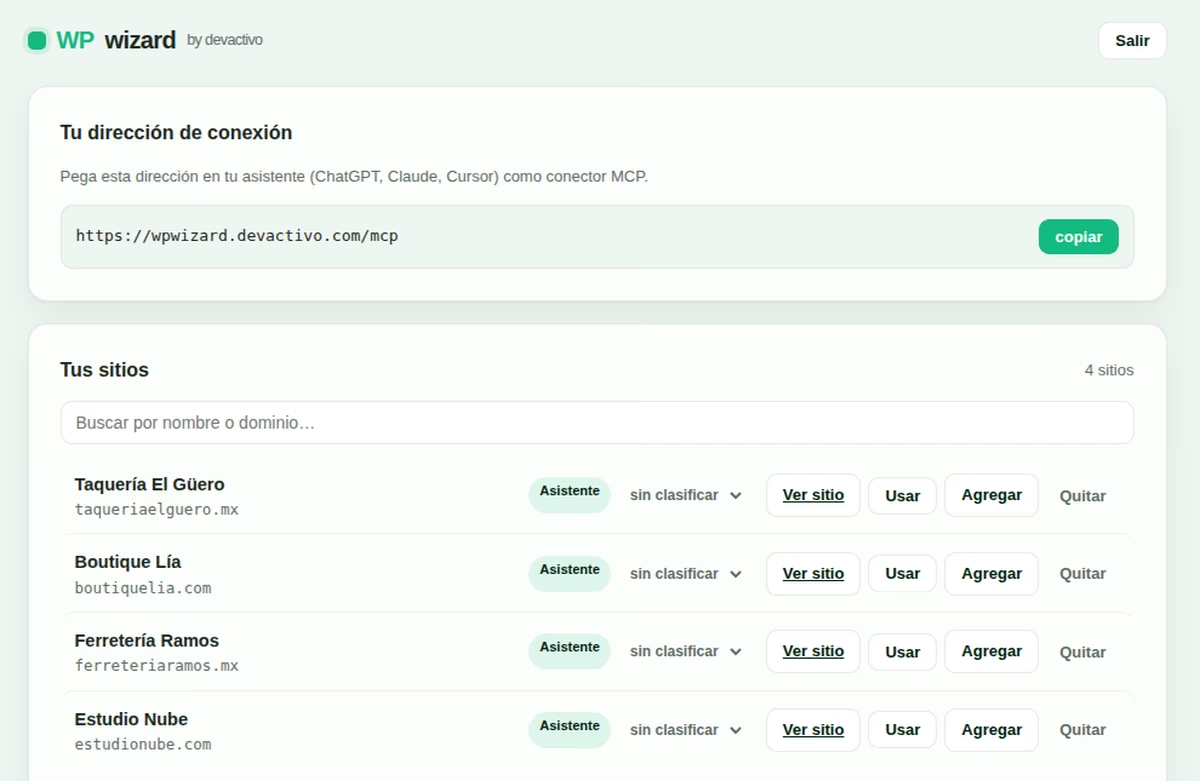
Open Settings → Connectors in ChatGPT and paste your connection address.

https://wpwizard.devactivo.com/mcp
3

Log in, pick the site and ask for what you need.

Works with any assistant that speaks MCP. You use the subscription you already have.

The WPwizard panel: your connection address and the list of your connected sites
What people ask

Before connecting.

Do I need to know how to code?

No. You write to your assistant in plain English and it takes care of it. WPwizard is the bridge between what you ask and your site.

Is it really free?

Yes. There's no paid plan and no usage fee. You pay your ChatGPT or Claude subscription as you already do; WPwizard charges nothing on top.

Can it break my site?

It's built so it doesn't. Every change is backed up before it's applied, tested in isolation and rolled back on its own if something fails. And if the site ever goes down, the rescue button brings it back.

Who can get into my site?

Only your assistant, with your account. The connector lives on your WordPress and the key is yours: remove it any time by deactivating the plugin. Nobody at devactivo logs into your site.

Which assistants does it work with?

ChatGPT, Claude, Cursor, Claude Code and any other that speaks the MCP protocol.

How many sites can I connect?

As many as you want. When you start, your assistant tells you which site is active, and you switch whenever you need.


Your site, finally listening to you.

Connect it today. It's free and every change keeps a backup.